How to Reset the Water Filter Light on Any Refrigerator — Every Brand (2025)
How to Reset the Water Filter Light on Any Refrigerator — Every Brand (2025)
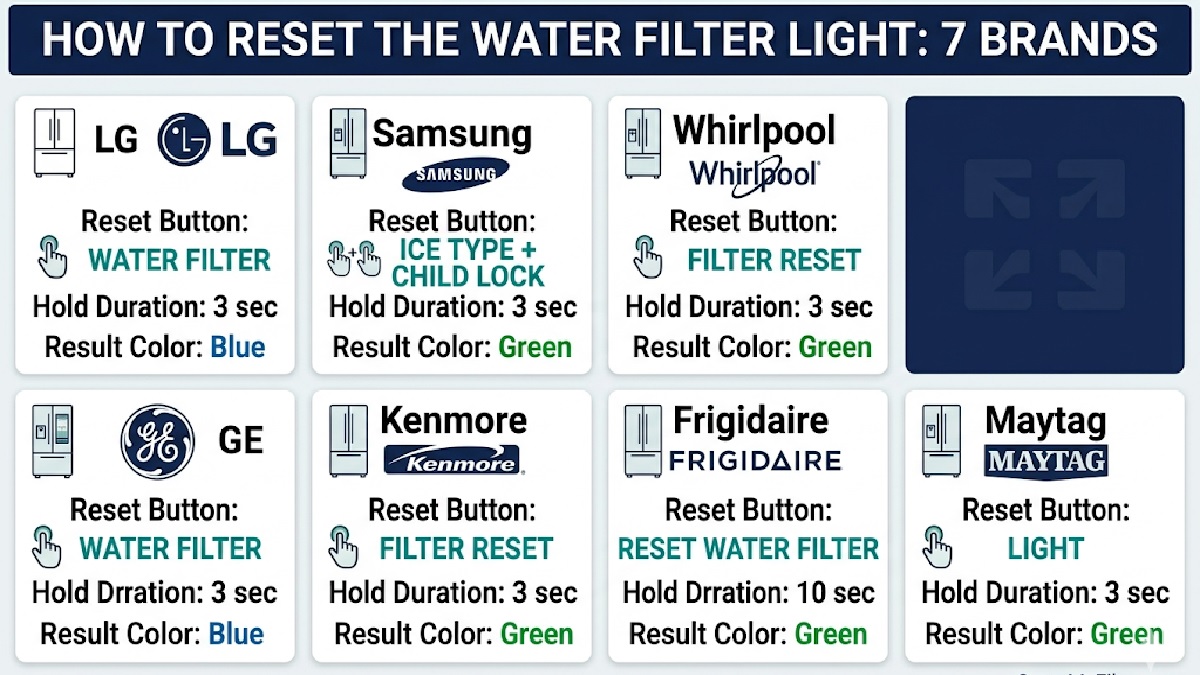
You have just installed a brand-new water filter. You close the fridge door, open it again — and the red filter light is still staring at you. Nothing appears to have changed. Is the filter defective? Did you install it wrong?
No. The filter warning light on every major refrigerator brand runs on a timer — not a sensor. It has no ability to detect whether a new filter is installed. It counts down a fixed number of days, turns red when the timer expires, and stays red until you manually reset it.
Always install the new filter first, then reset the light. The reset only resets the timer. Reset it after the new filter is in and flushed, so the countdown starts from your actual replacement date. Need help installing first? How to Replace a Refrigerator Water Filter — Step by Step.
LG Refrigerator Filter Reset
Ensure the new filter is installed and flushed.
Locate the “Water Filter” button on your LG control panel — usually on the door dispenser panel.
Press and hold for 3–5 seconds without releasing.
The indicator changes from red/orange to blue or turns off. Reset successful.
Samsung Refrigerator Filter Reset
Samsung has more reset method variation than any other brand. Find your series below:
Whirlpool Refrigerator Filter Reset
Install the new filter and flush 2–3 gallons.
Locate the “Filter Reset” or “Water Filter” button on the control panel.
Press and hold for 3 seconds until the indicator changes.
Light transitions from red/orange to blue or green, or turns off.
GE Refrigerator Filter Reset
Install and flush the new GE water filter.
Locate the “Reset Water Filter” or “Filter Reset” button on the dispenser panel or inside the refrigerator.
Press and hold for 3 seconds.
The “Change Filter” indicator turns off or changes to green.
Kenmore Refrigerator Filter Reset
Kenmore reset method depends on who manufactured your specific model:
Not sure who made your Kenmore? The first three digits of your model number identify the manufacturer (106 = Whirlpool, 795 = LG, 253 = Frigidaire). Use our Filter Compatibility Checker for confirmation.
Frigidaire Refrigerator Filter Reset
Install the new Frigidaire filter and complete the flush.
Locate the “Filter Reset” or “Pure Source” button on the control panel.
Hold for 3 seconds.
The Filter Status indicator resets to “Good” or green.
Maytag Refrigerator Filter Reset
Install the new Maytag filter and flush 2–3 gallons.
Locate the “Filter Reset” button on the dispenser or interior control panel.
Press and hold for 3 seconds.
The filter indicator changes from red/orange to blue/green or turns off.
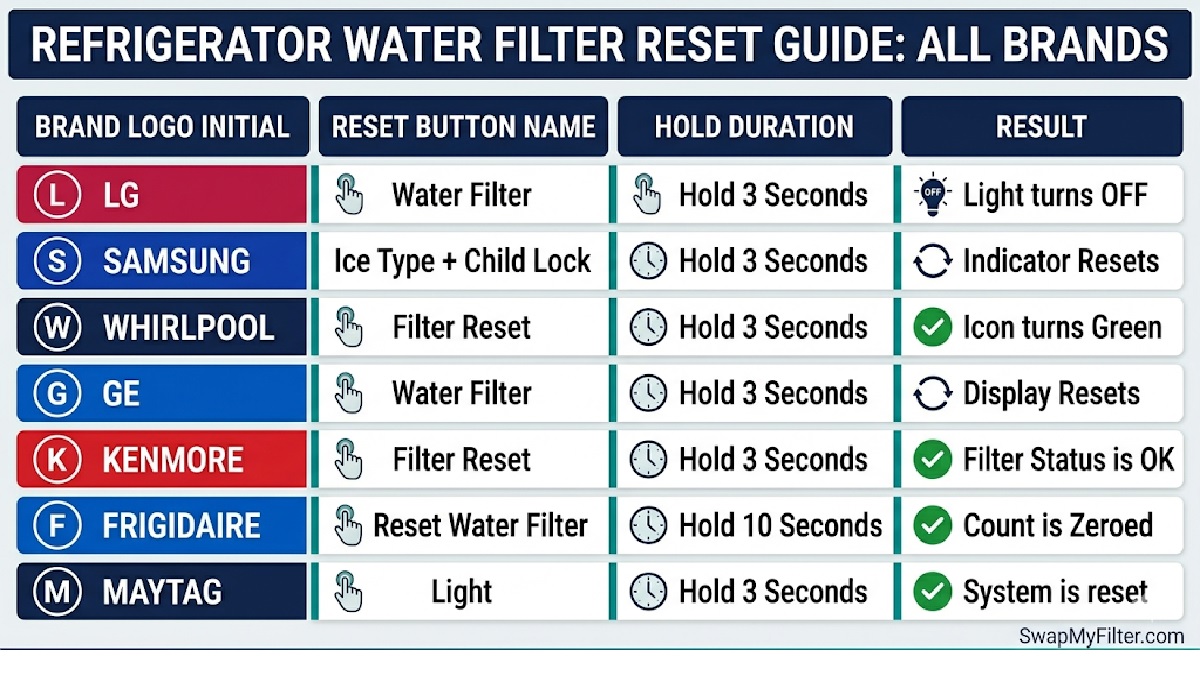
Quick Reference Table — All Brands
| Brand | Reset Button | Hold Duration | Result |
|---|---|---|---|
| LG | “Water Filter” or “Filter Reset” | 3–5 seconds | Turns blue or off |
| Samsung | Varies by model — see above | 3 seconds | Indicator clears |
| Whirlpool | “Filter Reset” or “Water Filter” | 3 seconds | Turns blue/green or off |
| GE | “Reset Water Filter” or “Filter Reset” | 3 seconds | “Change Filter” light off |
| Kenmore | Follows manufacturer (Whirlpool/LG/Frigidaire) | 3–5 seconds | Indicator off or green |
| Frigidaire | “Filter Reset” or “Pure Source” | 3 seconds | Status shows “Good” |
| Maytag | “Filter Reset” or “Water Filter” | 3 seconds | Turns blue or off |
App-Based Resets — LG ThinQ and Samsung SmartThings
📱 Smart Fridge App Reset Instructions
LG ThinQ App
- Open LG ThinQ app (iOS or Android)
- Ensure your LG fridge is connected to the same Wi-Fi network
- Tap your refrigerator from the home screen
- Tap the Settings gear icon (top right)
- Scroll to “Water Filter” or “Filter Management”
- Tap “Reset Filter Life” and confirm
- Bonus: enable filter replacement reminders to your phone
Samsung SmartThings App
- Open Samsung SmartThings app (iOS or Android)
- Tap your Samsung refrigerator tile
- Tap the three-dot menu (top right)
- Select “Information” or “Refrigerator Status”
- Tap “Water Filter” → “Reset” and confirm
The Filter Light Is a Timer — Not a Sensor
The most important thing to understand about the filter indicator on every major refrigerator brand: it is a countdown timer, not a water quality sensor.
- A green light does NOT mean your filter is working correctly — it might be 10 months old and completely saturated
- A red light immediately after installing a new filter is NOT a malfunction — you simply need to reset the timer
- The timer counts down from 180–185 days regardless of how much or how little you use the dispenser
The real indicators of filter performance are water taste, dispenser flow rate, and the calendar date of installation.
Why Is the Light Still Red After Resetting?
- Confirm you pressed the correct button — Samsung in particular has multiple possible reset buttons by model year
- Hold for the full 3–5 seconds — a quick tap never works; the hold must be sustained
- Confirm the filter is fully seated — some models detect filter installation through a physical switch; a partially inserted filter prevents reset
- Power cycle the refrigerator — unplug for 60 seconds, then plug back in; this clears the control board and often allows the reset to register
- Check for Demo Mode — some new refrigerators ship in showroom mode which disables the water system; check Settings and disable it
Contact our support team with your brand and full model number. We will identify the exact reset procedure for your unit. Persistent failure to reset after confirmed installation and multiple attempts may indicate a faulty filter sensor or control board — at that point, the manufacturer’s support line is the right call.
Frequently Asked Questions
Time to Replace Before You Reset?
Find your exact NSF-certified replacement filter in seconds. Same-day shipping before 2 PM EST. Free shipping over $35.
🔍 Find My Filter Now